
The e Panta Login system is an important digital service introduced by the Andhra Pradesh government to help farmers access agricultural records and government schemes online. Through the ePanta portal and mobile application, farmers can manage crop details, land information, and subsidy-related services without visiting government offices repeatedly. This guide explains everything about ePanta Login, including its purpose, benefits, steps to log in, common issues, and solutions.
What is e Panta Login?
e Panta Login is the secure access feature of the e Panta platform that allows registered farmers to sign in using their credentials. After logging in, users can view and update crop data, complete eKYC, check application status, and track benefits linked to agriculture welfare schemes. The login system ensures transparency, accuracy of records, and faster service delivery.
Purpose of ePanta Portal
The main goal of the ePanta portal is to digitize agricultural records and make farmer services easily accessible. It connects farmers directly with government databases, reducing paperwork and delays. With ePanta Login, farmers can manage their information from anywhere using a smartphone or computer.
Key Features Available After e Panta Login
Once a farmer successfully logs in, the following features become available:
- View registered land and crop details
- Update seasonal crop information
- Complete and verify eKYC
- Track application and verification status
- Access scheme-related updates and notifications
- Correct minor data errors through the portal
Eligibility for e Panta Login
To use ePanta Login, the user must meet the following conditions:
- The farmer should be registered in the state agricultural database
- Aadhaar number must be linked with land records
- A valid mobile number should be registered for OTP verification
- Land or tenant farming details must be available in official records
- If these requirements are met, login access can be easily completed.
How to Register Before e Panta Login
Farmers who are not yet registered must complete registration before logging in. Registration is usually done through:
- Village or ward secretariat
- Agriculture department officials
- Authorized CSC or MeeSeva centers
After registration, login credentials or OTP-based access are enabled for the farmer.
Step-by-Step Process for e Panta Login
Follow these steps to log in to the ePanta portal or app:
- Open the official website https://karshak.ap.gov.in/ecrop/
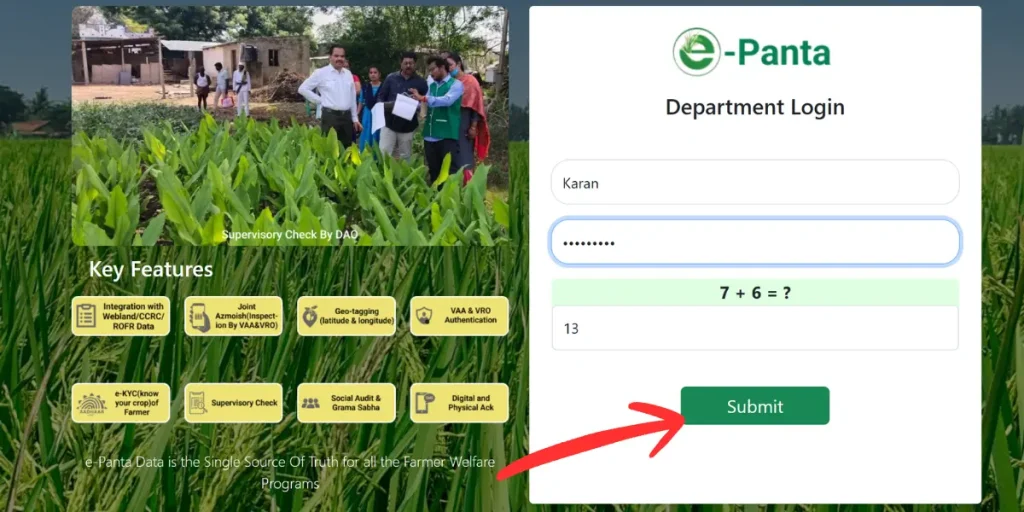
- Select the e Panta Login option on the homepage
- Enter the registered mobile number or Aadhaar number
- Request the OTP
- Enter the OTP received on the registered mobile number
- Submit the details to access the dashboard
After successful verification, the farmer can access all available services.
e Panta Login Through Mobile App
The ePanta mobile app provides a user-friendly experience for farmers who prefer smartphones. After installing the app, the login steps are similar to the web portal. The app is especially useful in rural areas, offering faster access and simple navigation.
Benefits of Using e Panta Login
Using ePanta Login provides multiple advantages:
- Saves time by reducing visits to government offices
- Improves transparency in crop and land records
- Ensures timely access to subsidies and schemes
- Reduces the chances of data mismatch or errors
- Enables direct communication between farmers and authorities
- These benefits make e Panta Login an essential digital tool for farmers.
Common Problems Faced During e Panta Login
Some farmers may face issues while logging in. Common problems include:
- OTP not received on the registered mobile number
- Incorrect Aadhaar or mobile number entered
- Network or server issues
- Incomplete registration or missing records
- eKYC not completed
- Understanding these issues helps in resolving them quickly.
How to Fix ePanta Login Issues?
Here are practical solutions for common login problems:
- Check the mobile network and retry the OTP request
- Ensure the entered mobile number matches registration records
- Wait and try again during non-peak hours if the server is slow
- Visit the nearest village secretariat or CSC for record correction
- Complete eKYC if it is pending
Frequently Asked Questions (FAQs)
How to Download E Panta Application Form pdf
Visit the official e-Panta website, open the application section, download the ePanta application form PDF, print it, fill in the required details, and submit it to the concerned office.
How to check e panta status?
Visit the e Panta portal or app, log in with Aadhaar or mobile number, go to the Status section, and view your eKYC or application status.
How to download e panta app?
Open Google Play Store, search e Panta app, select the official Andhra Pradesh government app, tap Install, and open it after download completes.
Is the e Panta app free to download?
Yes, the e Panta app is completely free and available on the Google Play Store.
Can I use e Panta without logging in?
Some basic information is viewable, but a login is required for full services and updates.